What this page is for: a plain-English overview of how Google organises things behind the scenes — your account, a project, the service accounts and the tools (APIs) that live inside it. You do not need this to follow our step-by-step guides, but if you have ever wondered “where does this thing actually sit?”, this map makes the rest click into place.
We have kept it deliberately simple. This is the getting-started picture, not the full detail.
The four layers, top to bottom #
| Layer | What it is |
|---|---|
| 1. Google Account | Your login — the same email you use for Gmail, Search Console, and so on. Everything else sits underneath it. |
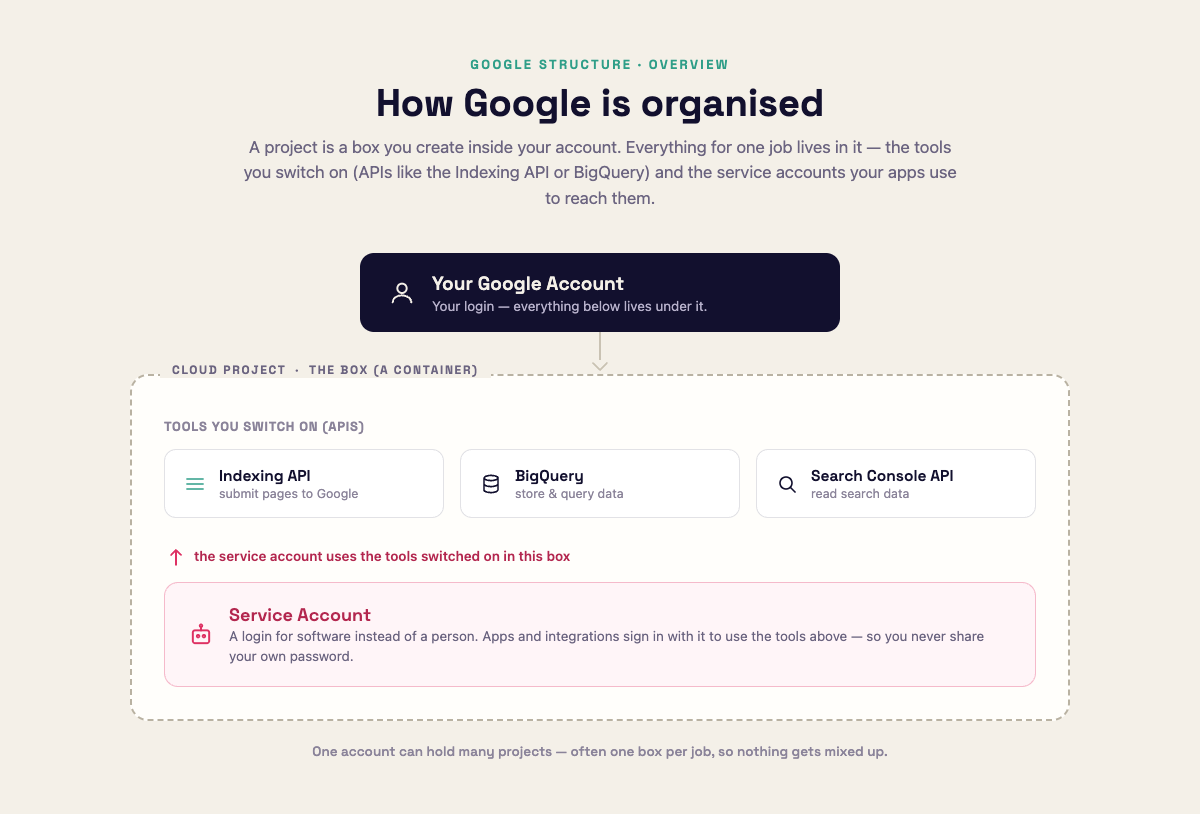
| 2. Project | A container inside Google Cloud. Think of it as a labelled box. Everything you switch on or create for a job lives inside one project, which keeps it tidy and separate from your other work. |
| 3a. Services / APIs | The Google tools you turn on inside the box — for example the Indexing API (submit pages to Google), BigQuery (store and query data), or the Search Console API. You enable only the ones you need. |
| 3b. Service Accounts | Robot logins that also live inside the box. They are the identities your apps and integrations use to call those tools — so you never hand over your own password. |
The key idea: the project is the box, and both the tools (APIs) and the service accounts sit inside it. A service account is simply a login used by software instead of a person, and it is allowed to use the tools that are switched on in its own project.
How it fits together #
A quick example #
When you set up Direct Index, you:
- Create a project (the box).
- Switch on the Indexing API (a tool in the box).
- Create a service account (a robot login in the same box).
- Give that service account its own key, and let it use the Indexing API to submit your pages.
Everything for that job lives in one project, so it is easy to find and easy to keep separate from anything else you do with Google.
Good to know #
- One account can hold many projects. A lot of people keep one project per job or per site, so things do not get mixed up.
- Turning a tool on costs nothing by itself. Enabling an API just makes it available in that project; you only ever pay if you actually use a paid service (many, like the Indexing API, are free).
- A service account only works inside its own project. If you need it to reach something outside — like your website in Search Console — you grant it access there explicitly (that is the “add as an Owner” step in our Direct Index guide).